
I Need a Whiteboard
When developing software, sometimes it's faster to work things out with a diagram than with words.
I often draw flowcharts or mind maps when designing a server architecture, mapping out a feature's flow, or laying out my thoughts before a meeting.
I used to rely on a web-based whiteboard service for this.
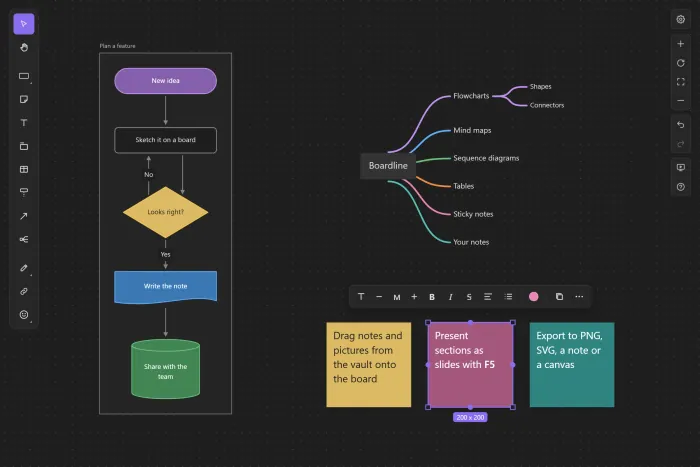
Shapes snapped to alignment guides, connectors routed neatly around them, and I could add branches to mind maps using only the keyboard.
It was a tool I knew well.
But as I mentioned in my post about starting this blog, I wasn't comfortable having my data locked into a platform that could shut down someday.
I'd already moved my knowledge management to Obsidian, but my diagrams were still sitting on someone else's server.
Obsidian does have a built-in Canvas feature, but I didn't like the way it connects cards.
So I decided to build my own whiteboard plugin.
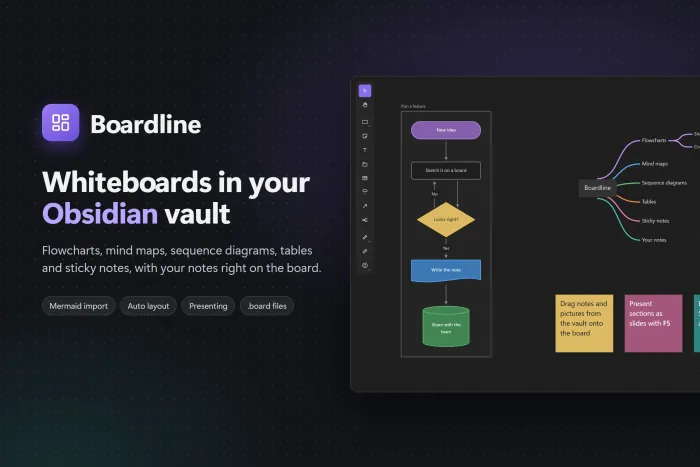
The result is Boardline, the Obsidian plugin I'm writing about today.
GitHub - kjs104901/obsidian-boardline
Vibe Coding Again
When I built this blog, Claude wrote the code and I reviewed and pasted it in. This time, Claude Code edited files directly in the repository, ran tests, and even made commits.
My role was more about deciding what features to build, trying them out, and pointing out anything that behaved strangely.
That meant it took only about two days to go from the initial idea to being listed as a community plugin.
That doesn't mean everything worked just by asking for it.
Features appeared quickly, but once I tried them, little things were off: connectors would bend in odd directions, or duplicated shapes would shrink in height.
Those details make a big difference in how a whiteboard feels to use, so most of the time went into a cycle of trying things out, pointing out problems, and fixing them.
I started with a desktop app, then switched to an Obsidian plugin partway through.
Since all my notes were already in Obsidian, keeping boards in the same vault meant I could put notes on boards and embed boards in notes.
I'd kept the board engine independent of both React and Obsidian from the start, so the move wasn't difficult.
Boardline
Each board is a single .board file.
It's human-readable JSON: the first line contains board information, followed by one object per line. Changing one object changes only one line, making diffs and sync conflicts easier to review.
Since it's a tool for use in Obsidian, I designed it to fit in with Obsidian.
- Default sizes and the grid match Obsidian Canvas, and the plugin follows Obsidian's light and dark themes and accent color.
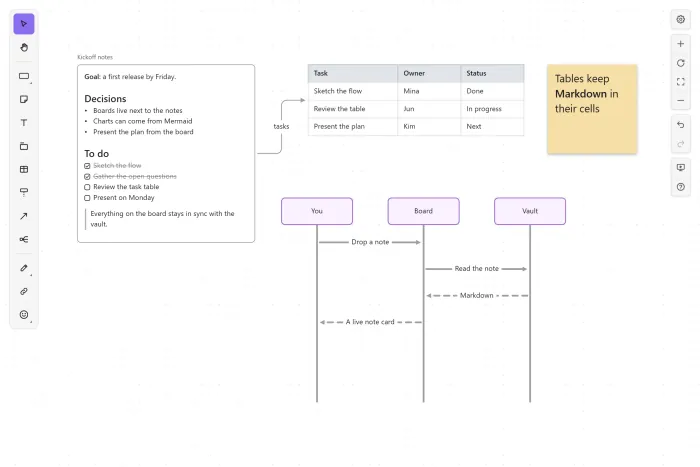
- Dragging a note onto a board creates a note card that renders its Markdown, and writing
![[보드 이름.board]]in a note embeds an image of the board. - If a file placed on a board is moved or renamed, its link on the board updates too.
- Pasting Mermaid converts it into board objects, and boards can also be exported to notes or canvases.
Lessons Learned
The tldraw License
At first, I planned to use an open-source whiteboard library like tldraw.
But without a license key, tldraw can only be used in a development environment, and the editor disappears if you build an app without one. Even an app for personal use was no exception.
tldraw/LICENSE.md at main · tldraw/tldraw
That would just mean trading a dependency on a service for a dependency on a library key, so I ended up building the engine myself with Canvas 2D.
What I liked most was the fine-grained feel of snapping and aligning nodes, so I probably would have reworked that part even if I'd used a library.
Script Tags in React 19
Obsidian plugins aren't allowed to load remote code.
But React 19's react-dom contains a createElement("script") call for preloading resources.
I wasn't using that feature, but it could have been flagged during review, so I downgraded React to 18.3.
The createEl Warning
The plugin passed review, but I received a warning to use Obsidian's createEl instead of document.createElement.
The code in question was in the board engine, which needed to be testable without Obsidian.
So I made the engine call only the @boardline/dom module and swapped out that module at build time.
The plugin build uses createEl, while tests use the standard createElement.
// esbuild.config.mjs (plugin)
alias: { '@boardline/dom': here('src/dom.ts') }      // createEl
// vitest.config.ts (tests)
alias: { '@boardline/dom': here('scripts/dom.ts') }  // document.createElement
The Disappearing Plugin
The day after it was listed, Boardline suddenly disappeared from the community plugin search.
I'd deleted and recreated the 1.0.3 release without attaching the files, leaving it impossible to install. It looks like the bot that updates the list removed it in the meantime.
It came back when I published 1.0.4. I think it's best not to touch a release once it's published.
Performance on Large Boards
When I made a board with 10,000 objects, a single render took nearly 350ms.
I brought that down to around 2ms by drawing only what's visible, skipping text that's too small to read, and caching calculations such as connector paths.
Wrapping Up
When I built this blog, AI was a tool that wrote code for me. This time, I handed it the entire repository and spent my time trying things out and pointing out problems.
Even so, deciding what to build and judging which behaviors were wrong were still up to me.
Boardline is now at version 1.0.6, and you can install it by searching for it in Obsidian's community plugins.
If you try it and run into anything frustrating, I'd appreciate it if you let me know by opening a GitHub issue.